
A pinball shooter rod is the metal shaft and handle of the plunger, the part you pull back and release to launch the ball into play. Stock rods get the job done. A themed replacement rod changes how the front of your machine looks and feels every time you start a game. This guide covers how the assembly works, the difference between a rod, a knob and a plate, how to tell what will fit, how to install one, and how to keep the whole plunger running smoothly.
TL;DR
- The shooter rod is the part of the plunger you grip. Behind it sits a spring that stores the energy that launches the ball.
- A themed rod swaps the look and feel of your launch handle. Many replacements are made for a specific title, so match the rod to your game.
- Check your machine’s manufacturer and platform before ordering. Stern rods are built around Stern cabinets and mounting.
- Installing usually means opening the cabinet front and working carefully. Unplug the machine before you start.
- Clean the housing, check the spring and make sure the tip lines up with the ball. A smooth plunger makes every skill shot easier.
Table of Contents
- What a pinball shooter rod does
- Shooter rod, shooter knob and shooter plate: what is the difference
- Styles and customization options
- How to tell whether a rod will fit your machine
- How to install a shooter rod
- Keeping the plunger smooth
- Our perspective
- Pairing a rod with other accessories
- Shop shooter rods and machines with us
- Matching a rod to the kind of owner you are
- FAQ
- Sources
What a pinball shooter rod does
On most machines the plunger sits on the right side of the cabinet. You pull it back, let go, and a spring slams it into the ball and sends it up the lane and into the playfield. Pinball Land’s overview of starting a machine describes exactly that action. The rod is the visible, grippable end of that assembly.
It matters more than it looks. The distance you pull back sets how hard the ball is launched, and that is the heart of the skill shot, the first shot of a ball where a precise launch can earn bonus points or start a feature. Flipcommons notes that the plunger sits in the front-right corner of the cabinet, in the lockdown bar or apron area, so the player controls launch force by hand.
Not every machine launches the same way. The Mission Pinball Framework documentation describes mechanical spring plungers, coil-fired launchers, and combination assemblies that allow either a manual pull or a game-controlled launch. Many modern machines still use the classic pull-and-release rod, and that is the style most accessory rods are designed to replace or dress up.
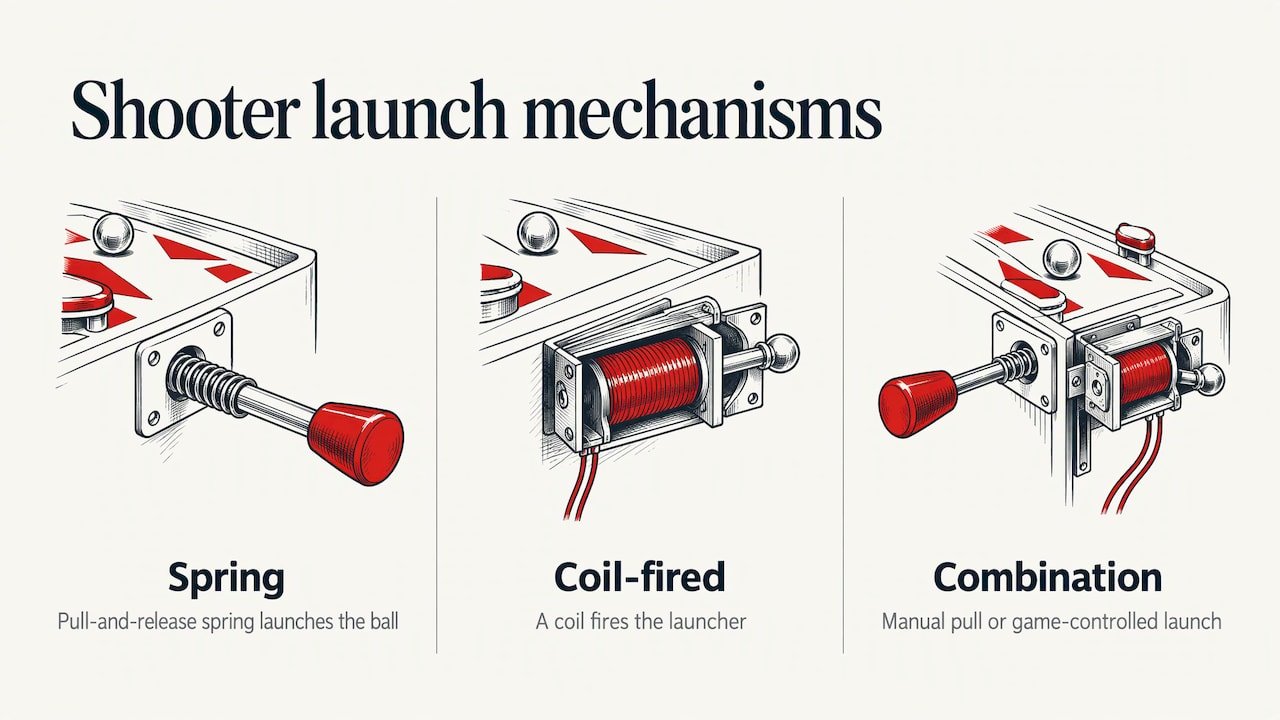
The basic parts
Knowing the names helps when you shop and when you troubleshoot.
- Rod (shaft): the long metal piece that slides through the cabinet.
- Knob or handle: what you actually grip. On a stock machine it is a simple round or cylindrical end. On a themed accessory it can be a sculpted figure, prop or icon.
- Spring: sits around the rod inside the housing and provides the launch force.
- Tip: the end of the rod that strikes the ball.
- Plate or housing: the metal or plastic piece at the cabinet front that the rod passes through.
Shooter rod, shooter knob and shooter plate: what is the difference
The terms get mixed together, even by sellers, so here is a practical way to read a listing.
| Term | What it usually means | When you want it |
|---|---|---|
| Shooter rod | The full launch rod with its themed end, designed to replace the stock one | You want a complete swap with a matching look |
| Shooter knob | The grip or end piece, sometimes sold as an accessory that works with the rod | You want to change the handle’s look and feel |
| Shooter plate | The plate at the cabinet front around the rod opening | You want a matching finish or a lit effect around the rod |
In practice, listings use “rod” and “knob” loosely. Some products are sold as a knob but behave like a full rod accessory. Read the product description and photos for what is in the box, and check the listed compatible titles. If you are unsure, our team can help match a part to your machine before you order.
Styles and customization options
Shooter rods are one of the most visible small upgrades you can make, because your hand touches them every ball. Here are the styles you will see.
Licensed and theme-matched rods
These are made to reflect a specific game: a dinosaur, a comic character, a movie prop, a band icon. They tie the front of the cabinet to the artwork on the playfield and backglass. We carry themed options such as the Jurassic Park shooter rod, the Venom shooter rod, the Guardians of the Galaxy shooter rod and the James Bond 007 shooter knob.
Custom and generic designs
Independent makers produce rods with 3D-printed, painted or cast ends, and some let you choose a design or request your own. Crystal balls, skulls, props and abstract shapes are common. These suit owners who want something no one else on the block has, or who own a game without an official rod.
Lit rods and matching plates
Some accessory rods and plates include lighting that ties into the machine’s cabinet effects. If a listing mentions lighting, check what connection it needs and whether your game has the matching header before you buy. Lit versions can come with extra wiring and installation steps, so read the product details first.
Weight, finish and feel
Looks are only part of the story. A heavier end can feel more solid in the hand, and a smooth finish makes repeated pulls comfortable. Think about who plays the machine. A family room game will see plenty of enthusiastic pulls, while a collector’s showpiece may only see careful ones. Choose a piece that fits how the machine is actually used.
How to tell whether a rod will fit your machine
This is the question that causes the most returns across the hobby, so slow down here.
- Identify your machine’s manufacturer and exact title. Stern, Spooky, American Pinball and Barrels of Fun machines each use different cabinet hardware. Accessories are generally made with one platform in mind.
- Check the compatible titles in the listing. A rod made for one game may physically fit others, but the listing is your guide. If it names titles, stay with those.
- Look at your current setup. Is your game a Pro, Premium or Limited Edition? Cabinet fronts and lockdown bars can differ across trims of the same title.
- Note whether the rod is lit. If your game has no cabinet lighting connection for it, choose an unlit version or confirm what the lit version requires.
- Ask before you buy if anything is unclear. Send us your machine’s title and trim and we will help you pick the right piece.
If you are replacing a rod on a game you are still shopping for, look at the manufacturer’s accessory range alongside the machine. Our Stern accessories category groups official add-ons so you can see what is made for your title.
How to install a shooter rod
Installation is manageable for most owners with basic hand tools, patience and a clear workspace. Always follow the instructions that come with your specific accessory, because they differ by game and product.
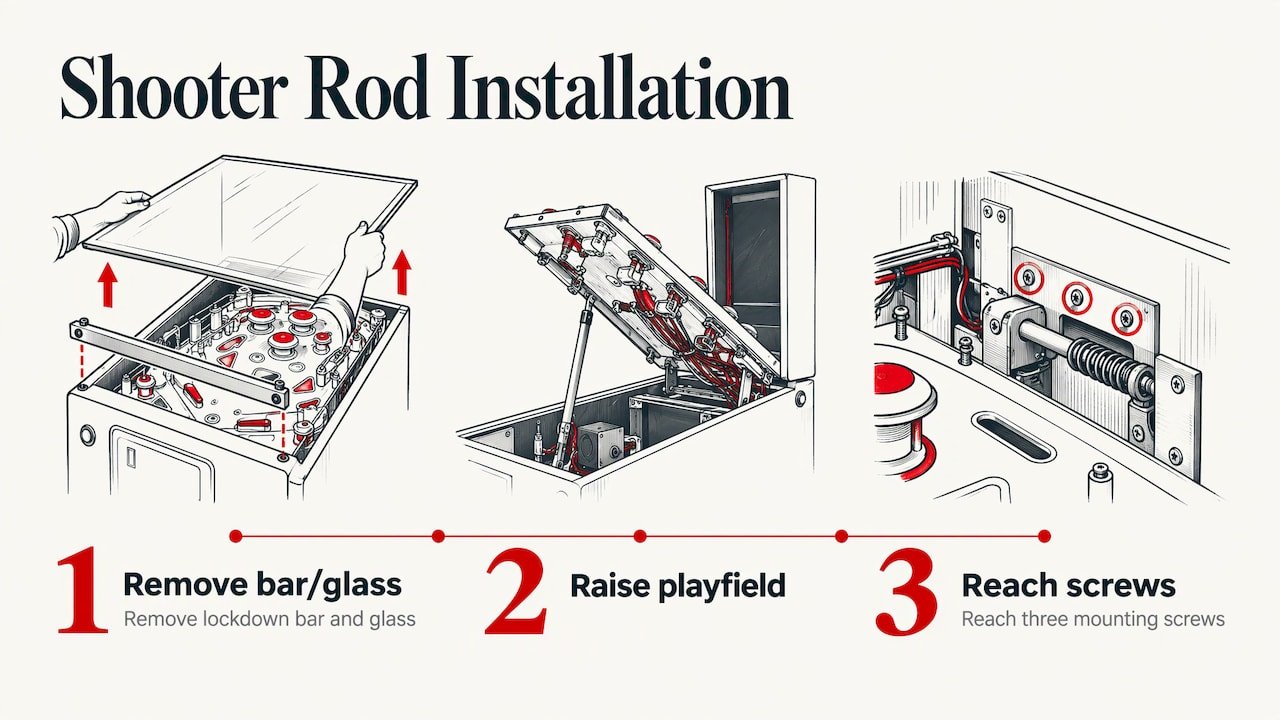
On Stern machines, a common outline looks like this, as one summary of the procedure notes: the lockdown bar and glass come off, the playfield is raised, and three mounting screws are reached from there.
Before you start
- Turn the machine off and unplug it. You will be reaching near wiring and moving parts.
- Clear a surface for glass, the lockdown bar and screws. Use a soft towel to protect the glass and the cabinet finish.
- Get a second person for the glass and the playfield. Glass is heavy and awkward to handle alone.
- Photograph the existing rod, plate and hardware from a few angles so you can retrace your steps.
General steps
- Remove the lockdown bar and the glass, setting both down carefully.
- Raise the playfield and secure it using the machine’s normal support so it cannot drop.
- Remove the old rod assembly’s mounting screws and lift out the rod, keeping the spring and washers in order.
- Fit the new rod or knob according to its instructions. Keep the spring seated and the washers in the same order.
- If the accessory has a plate, align it with the cabinet front. A strip of painter’s tape marking the old outline can help you line it up.
- If the accessory is lit, route and connect the wiring as the instructions describe, keeping it clear of moving parts.
- Lower the playfield, refit the glass and lockdown bar, plug in the machine and test several launches.
Check that the tip meets the ball squarely and that the rod returns fully after each pull. If it feels different from before, stop and recheck the spring and washers before playing on.
Keeping the plunger smooth
A new rod only feels great if the assembly behind it is clean and set up correctly. Mr. Pinball’s repair tip outlines the usual routine: clean the rod, springs, washers and housing, replace a worn sleeve or a weak spring, and check that the tip is centered on the ball track. Dirt inside the housing can make the action sticky or sluggish.
A simple maintenance rhythm:
- Wipe the rod with a clean, dry cloth when you clean the playfield glass.
- Look at the tip for wear or flat spots, and see that it lines up with the ball.
- Listen and feel for grit or drag when you pull. That usually points to dirt in the housing.
- Replace a tired spring if your launches have become weak or inconsistent.
A consistent launch makes skill shots repeatable, and that is what the plunger is for.
Our perspective
We sell pinball machines and accessories every day, and we see the same pattern: owners spend weeks choosing a machine, then discover that the small touches are what make it theirs. A themed shooter rod is the clearest example. It is the part you touch every single game.
As an authorized dealer for brands like Stern Pinball and Spooky Pinball, we focus on official, theme-matched pieces that are made with the machine’s artwork in mind. When a rod, a topper and a set of art blades all draw from the same design, the game looks finished from the front.
Our advice is to start with the part you touch most. A shooter rod is a small step that makes the whole machine feel more personal, and it pairs well with other accessories such as toppers, art blades and lighting kits as your collection grows.
the author
Pairing a rod with other accessories
Once the rod is in, the front of the machine often invites more. Here are natural companions, all available from our store.
- Toppers: sit above the backbox and add a sculpted focal point. See the Black Knight topper or the Venom topper.
- Art blades: decorate the sides of the cabinet front. The Jaws art blades are one example.
- Lighting: kits such as the Rush expression lighting system or the LE speaker light kit change how the cabinet looks in a dim room.
- Feel and protection: a shaker motor kit adds vibration to the play experience, and the Jurassic Park player mat is a themed floor piece for the area in front of the game.
One rule of thumb: pick a theme and stay with it. A game that has a matching rod, topper and blades reads as one design rather than a collection of parts.
Shop shooter rods and machines with us
If you are ready to upgrade a game you own, or to find the machine to go with the accessories, we can help. We are an authorized dealer for Stern Pinball and Spooky Pinball, and we offer new and used machines, official accessories, and a buy, sell and trade service. Nationwide delivery covers the lower 48 states, and we accept Bitcoin and other cryptocurrency.
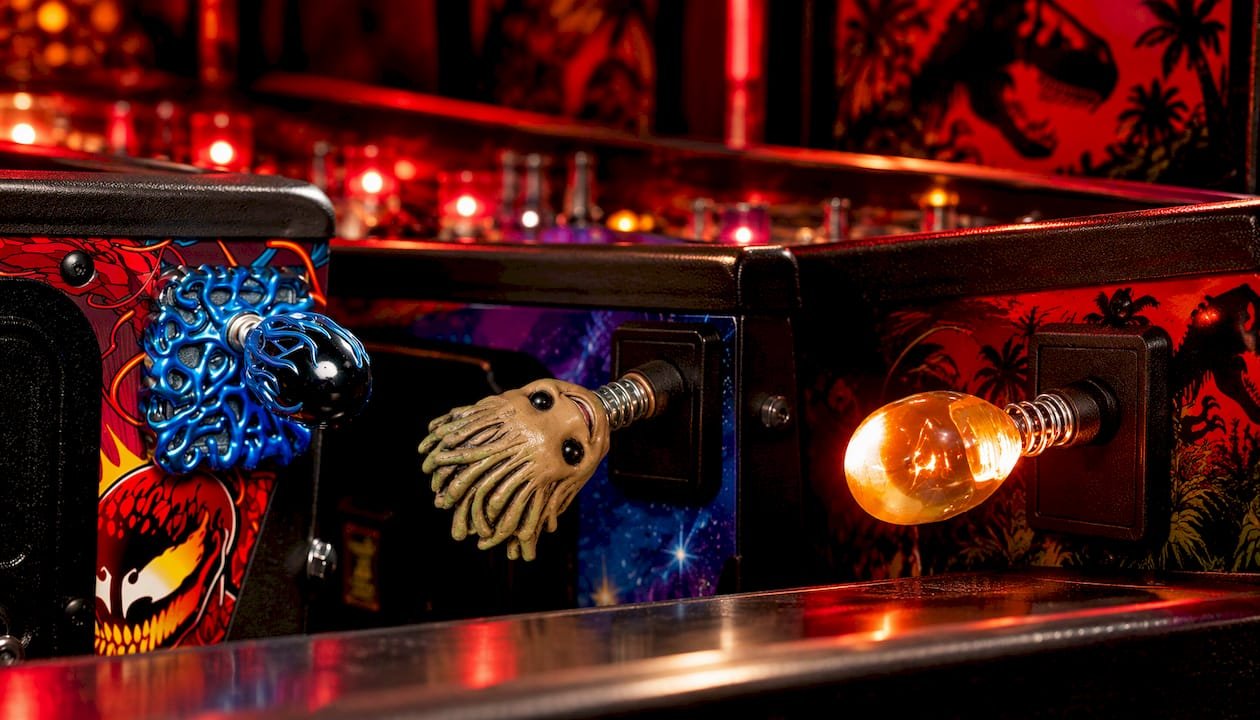
Browse the themed rods linked above, explore our Stern accessories, or look through our pinball machines if you are still choosing a game. For help with a specific title, start at Old Town Pinballs.
Matching a rod to the kind of owner you are
Different buyers want different things from the same part.
- Collectors: look for officially licensed rods that match the title’s artwork, and keep your original parts if you ever want the game back to stock.
- New owners: start with a rod for the game you already love. It is a low-effort upgrade that teaches you how the front of the cabinet comes apart.
- Families: pick a design that feels good in smaller hands and holds up to frequent play.
- Business owners: a themed rod and topper help a machine stand out in a bar, shop or game room, and a clean, smooth plunger keeps the game ready for visitors.
If you are choosing a machine for a business, our Stern pinball machines and American Pinball categories are good places to look, and our Barrels of Fun range is worth a browse too.
FAQ
What is a pinball shooter rod?
It is the rod and handle of the plunger, the part you pull back and release to launch the ball. A spring behind it supplies the launch force. Themed replacements change the handle’s look and feel while keeping the same job.
Is a shooter knob the same as a shooter rod?
Not always. The knob is the grip at the end, while the rod is the full shaft, and some accessories replace one or both. Sellers use the words loosely, so read the product description and compatible titles to see what is included.
Will any shooter rod fit my pinball machine?
No. Accessories are designed around a manufacturer’s platform and often a specific title, and trims such as Pro, Premium and Limited Edition can differ. Confirm the compatible titles in the listing, and contact us with your machine’s title if you want a second opinion.
Can I install a shooter rod myself?
Most owners with basic tools can. Unplug the machine, get help lifting the glass and playfield, and follow the instructions that come with the accessory. Lit rods may involve extra wiring, so read those steps first.
Why does my plunger feel sticky or weak?
Dirt in the housing is a common cause of a sticky action, and a worn spring can weaken launches. Cleaning the rod, springs, washers and housing, and checking that the tip is centered on the ball track, are the usual first steps.
Sources
- How to Start a Pinball Machine, Pinball Land
- Plungers, Flipcommons Pinball Encyclopedia
- Plungers and Ball Launch Devices, Mission Pinball Framework
- Shooter rod and plunger maintenance tip, Mr. Pinball Repair Tips